Widget-based context folders for Android home screens
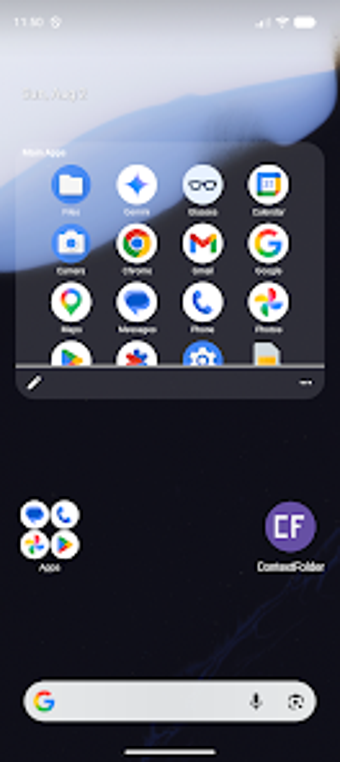
ContextFolder: Smart Widget, from SS App Dev Studio, is a home-screen personalization widget that dynamically surfaces apps based on situational triggers. The app monitors Bluetooth connections, time windows, and driving activity to show or hide relevant shortcuts without replacing your existing launcher. It offers manual profile layers and two widget styles, making it suited to Android users who prefer context-aware access and reduced on-screen clutter.
The widget adapts visible shortcuts to the current situation
ContextFolder detects triggers such as Bluetooth device connections, time of day, and driving via the Activity Recognition API to change which apps are visible. The widget promotes or hides icons according to real-time rules, so shortcuts relevant to commuting, work hours, or a paired speaker appear when those conditions match. This behaviour replaces static folders with a context-driven surface for quick access.
You can layer profiles and choose two compact layouts
The tool exposes manual profile layers for one-tap switching alongside automatic rules, giving users multiple control paths. It provides two widget styles: a full scrollable grid for broader visibility and a compact badge for minimal footprint. Time-based rules and per-trigger visibility let you tailor which apps surface during work, home, or evening periods without reorganizing icons by hand.
Designed to work with existing launchers and respect privacy
The widget model keeps your current launcher intact, so it integrates with custom home setups instead of replacing them. The developer describes limited permissions and a no-unnecessary-data approach, which reduces the scope of background access. Because the app relies on modern Android features such as Activity Recognition, its capabilities depend on platform support present on recent devices.
Setup is straightforward and supports manual overrides for daily use
Adding the widget to a home-screen page gives immediate access to context rules and profile switching; no launcher replacement is required. Manual toggles let you switch contexts quickly when automatic detection does not match intent. Bluetooth triggers include a reconnect grace period to prevent rapid UI changes during device handshakes, reducing visual flicker while profiles change.
Practical choice for organized, context-aware Android users
ContextFolder is a pragmatic option for Android users seeking dynamic home-screen organization that adapts to activity and connections. One consideration is that some advanced automation and external-control capabilities are available only in the app's pro tier and require enabling intents, so heavy Tasker-style workflows need extra setup. For anyone who wants situational shortcuts without altering their launcher, this tool provides a focused, privacy-minded solution.